
How do I book a show home viewing online?
To book a show home viewing online, go to newhomesforsale.co.uk, search for a development, then click “request a viewing”. Enter your details and preferred date. Your request is sent directly to the developer, who confirms your appointment. This allows you to easily arrange and secure a show home viewing online.
This guide explains exactly how to book a show home viewing online, what to expect and how to make the most of your visit.
What is a show home viewing?
A show home viewing is a scheduled visit to a professionally designed property on a new build development. These homes are staged to demonstrate what the finished properties will look like, including layout, interior design and available upgrades.
Unlike viewing a lived-in property, show homes are carefully presented to help buyers imagine how a brand-new home could look once completed. Developers often include upgraded fixtures, furniture and styling to showcase the full potential of the space.Booking a viewing gives you the chance to walk through the home, ask questions and understand the development in more detail.
Advantages of booking with newhomesforsale.co.uk
Booking a show home viewing online has several advantages:
- Speed and convenience - You can book anytime, without waiting for office hours
- Clear availability - See open time slots instantly
- Better comparison - Browse multiple developments before choosing
- Direct communication - Your enquiry goes straight to the developer
- Less pressure - You can explore options at your own pace
newhomesforsale.co.uk makes this process streamlined by centralising listings from multiple developers in one place.
How do I book a show home viewing online?
1. Visit the property search platform
Start by going to newhomesforsale.co.uk and using the search function. You can filter by location, price range, property type or number of bedrooms.
This helps narrow down developments that match your requirements before you even book a viewing.
2. Browse available developments
Once you’ve entered your preferences, you’ll see a list of new build developments. Each listing typically includes:
- Property types available
- Price ranges
- Developer information
- Photos and floor plans
- Completion dates
- Key features of the site
Take your time comparing options. The goal is to find a development where a show home visit would be genuinely useful in your decision-making.
3. Select a development
When you find a development that interests you, click through to the full listing page. This is where you’ll find detailed information about the site and available homes.
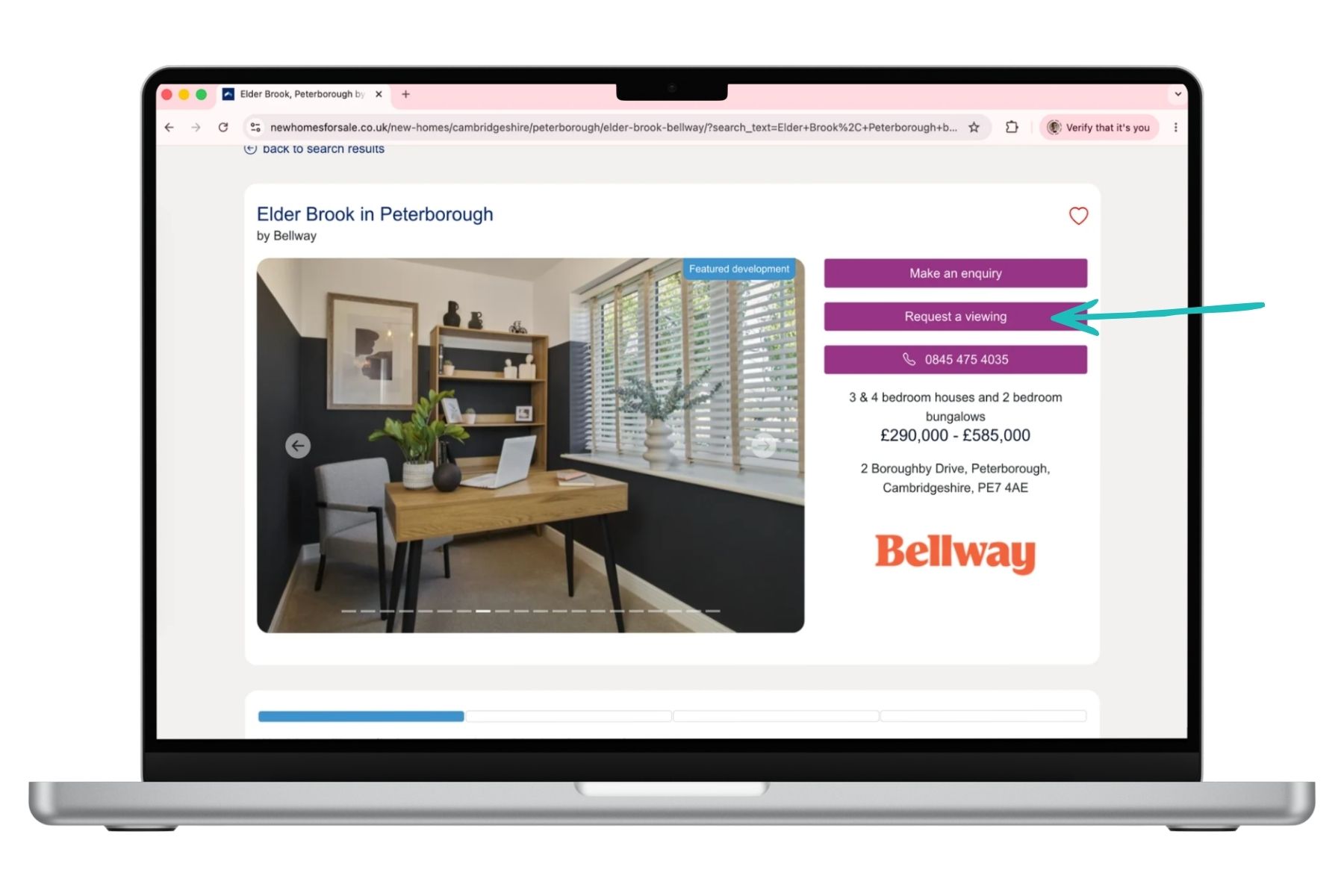
You’ll also usually see a “request a viewing” or “arrange a visit” option. This is the entry point for scheduling your show home appointment.
4. Choose “request a viewing”
Listings on newhomesforsale.co.uk will include a booking form directly on the page.
You’ll typically be asked to provide:
- Your name
- Contact details (email and phone number)
- Preferred viewing date
- Any specific questions or requirements
Some developers may also allow you to select whether you want an in-person viewing or a virtual tour.
6. Receive confirmation
After submitting your request, you will receive a confirmation email or phone call from the developer or sales team.
This confirmation may include:
- Date and time of viewing
- Address of the show home
- Parking instructions
- Contact details for the sales representative
At this stage, your booking is secured.
What happens during a show home viewing?
When you arrive at the development, a sales advisor will usually greet you and guide you through the show home.
During the visit, you can expect:
- A full walkthrough of the property
- Explanation of layouts and room sizes
- Information about available upgrades
- Details on pricing and incentives
- Guidance on plot availability
This is also your opportunity to ask questions about build quality, energy efficiency and estimated completion dates.
Show homes are designed to help you visualise living in the space, so take your time exploring each room.
What should I do before booking a viewing?
Before you book through newhomesforsale.co.uk, it helps to be prepared so you get the most out of your visit.
Know your budget
Have a clear idea of what you can afford, including mortgage limits and deposit requirements.
Understand your priorities
Think about what matters most:
- Number of bedrooms
- Garden space
- Commuting distance
- Energy efficiency
Research the development
Look at site plans and available property types so you know what to expect. What amenities and schools are nearby?
Prepare questions
Write down anything you want to ask the home builder, such as:
- What is included as standard?
- Are there upgrade options?
- What are the service charges?
- What warranties are provided?
Tips for booking the best viewing experience
To get the most from your online booking process:
- Visit more than one show home if possible
- Different house types within the same development
- Take photos and notes during your visit
- Ask about future phases of development
Using a platform like newhomesforsale.co.uk makes it easier to explore multiple developments before committing to a viewing.
Can you book multiple viewings?
Yes. You can book multiple show home viewings online if you are comparing developments.
In fact, this is often recommended. Viewing more than one home helps you understand differences in layout, specification and pricing across different sites.
The online booking system on newhomesforsale.co.uk makes it easy to schedule several appointments without needing to make separate phone calls.
Virtual show home viewings
In some cases, developers also offer virtual show home tours. These are useful if you cannot attend in person or want an initial overview before booking a physical visit.
A virtual viewing typically includes:
- Video walkthroughs
- 360-degree room views
- Online Q&A with a sales advisor
You can often request a virtual tour through the same booking form used for in-person viewings.
Common mistakes to avoid
When booking a show home viewing online, avoid:
- Booking without checking travel distance
- Not comparing multiple developments
- Forgetting to ask about extra costs (like upgrades or fees)
- Rushing into a decision after one visit
- Ignoring future development plans around the site
Taking a structured approach helps ensure you choose the right home.
Final thoughts
Booking a show home viewing online is a straightforward process that gives buyers direct access to new build developments without unnecessary delays. By using a property portal like newhomesforsale.co.uk you can search available homes, compare developments and arrange viewings in just a few steps.
From selecting a property to confirming your appointment, everything can be done digitally, making the process faster and more convenient than traditional methods. Whether you are a first-time buyer or moving into a larger home, booking a show home viewing online is often the best first step toward finding your ideal new build property.
Disclaimer
newhomesforsale.co.uk is a property portal and not a financial advisor, mortgage broker or mortgage lender. Always seek independent financial advice before making significant decisions about your money, mortgages or purchasing a property.
All information included in our articles is accurate to the best of our knowledge at the time of publication. However, any references to dates, prices and availability are subject to change without notice.
Please note that stock images used on this website are licensed from Canva.com.
Publish date 19th May, 2026
Reading time: 3 minutes
Written by Heather Bowles
Related topics



Interior design trends for 2026: A shift toward warmth, comfort and character
Reading time: 5 minutes